

A Google Business Profile for doctors is the free listing that shows your practice in Google Maps and the local results. To rank it, choose the right primary category, complete every field, add real photos and collect steady reviews. Google ranks local results on relevance, distance and prominence, so each fix targets one of those three signals.
Most patients meet your practice on Google before they ever see your website. They search “pediatrician near me” or “dermatologist in Austin”. Then they compare three listings in the map pack. A well-built Google Business Profile for doctors decides whether you are one of those three.
This guide walks through the exact setup we use for US practices. It also covers the mistakes that get medical listings suspended.
What is a Google Business Profile for doctors?
It is the free business listing Google shows in Search and Maps. Specifically, it holds your name, address, phone, hours, photos, services and reviews. Patients can also call, book or get directions from it in one tap.
For a medical practice, the profile works like a second homepage. In fact, many patients never click through to the website at all. That is why the listing deserves the same care as your site.
How Google ranks a Google Business Profile for doctors
Google explains its own local ranking in its help center. It uses three main factors:
- Relevance: how well your profile matches the search.
- Distance: how far you are from the searcher.
- Prominence: how well known and trusted your practice is.
You cannot change distance. However, you can improve relevance with categories and services. You can also build prominence with reviews, links and mentions across the web.
Google Business Profile for doctors: setup steps 1 to 5
Work through these steps in order. Although each one is quick, but together they make a large difference.

1. Claim and verify every location: First, claim one profile for each physical office. Verify it by video, phone or mail. Never create a listing for an address where you do not see patients.
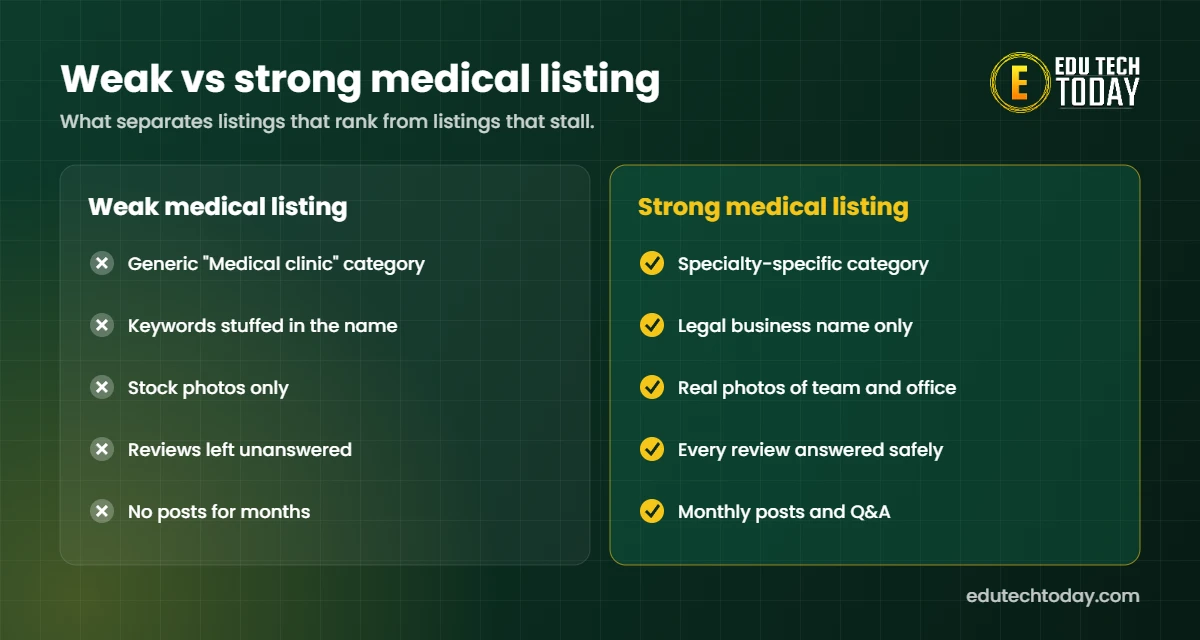
2. Choose the right primary category: The primary category is the strongest relevance signal. For example, a skin clinic should use “Dermatologist”, not just “Medical clinic”. Then add a few secondary categories for other services. Our free category finder shows what top local competitors use.
3. Use your real business name: Above all, keep the name exactly as it appears on your signage. Adding keywords like “Best Family Doctor” breaks Google’s rules. As a result, the listing can be suspended.
4. Complete every field: Add hours, holiday hours, phone, website, services and accessibility details. Also add the insurance and booking links if Google offers them for your category.
5. Write a clear description: Next, use 750 characters to say who you treat, what you treat and where. Write it for patients, not for search engines.
Steps 6 to 10: keep the profile active and trusted
6. Upload real photos: In addition, show the building, the entrance, the waiting room and the team. Real photos build trust before the first visit. Stock images do the opposite.
7. Build a steady review habit: Patients care about reviews more than almost anything else. In a 2025 rater8 survey, 84% of patients said they check online reviews before choosing a provider. So ask every happy patient, every week. Our review link generator creates the short link for you, and our Google reviews guide covers the full system.
8. Reply to reviews without sharing health details: Thank every reviewer. However, never confirm that someone is a patient or mention their care. That protects you under HIPAA.
9. Post updates every month: For example, share new services, flu shot dates or new doctors. Posts show Google the profile is active.
10. Keep your details consistent everywhere: Similarly, your name, address and phone should match on your website, Healthgrades, Zocdoc and insurance directories. Mixed details confuse both Google and patients.
Should doctors get their own Google Business Profile?
In short, it depends on the size of the practice. Google’s business profile guidelines allow listings for individual practitioners who serve the public. However, a solo doctor with one office should use one combined profile instead. For group practices, a profile for the practice plus one per physician usually works best.
Common mistakes that get medical listings suspended
- Keyword stuffing in the business name.
- Using a virtual office or PO box as the address.
- Creating duplicate listings for the same location.
- Changing many key details at once.
If a suspension happens, fix the cause first. Then submit a reinstatement request with proof of address, such as a utility bill or business license.
How your profile feeds AI search answers
Google AI Overviews and Gemini pull heavily from Maps data. ChatGPT and Perplexity also read reviews and directory listings. So a complete profile helps you appear in AI answers as well. We explain the wider picture in our guide to AI visibility for medical practices.
Your profile also works best with a strong website behind it. For that side, read our guide to SEO for physicians.
When to hand your listing to a specialist
Overall, most practices can complete the first five steps in an afternoon. The hard part is consistency: reviews, replies and posts every single week. That is where busy front desks fall behind.
If that sounds familiar, our healthcare marketing team can manage your Google Business Profile for doctors and staff month after month. Not sure yet? Compare the options in our guide on whether to outsource practice marketing.
Frequently asked questions
How do I set up a Google Business Profile for doctors?
Go to business.google.com, search for your practice, then claim or create the listing. Next, verify it by video, phone or mail. Finally, complete the category, hours, services, photos and description.
Is a Google Business Profile free for medical practices?
Yes. Creating and managing the profile is free. You only pay if you choose to run Google Ads alongside it.
Why is my medical practice not showing on Google Maps?
Common causes are an unverified or suspended listing, the wrong primary category, too few reviews or inconsistent contact details. Searchers far from your office may also see closer practices first. See our 9 fixes for Google Maps visibility.
How many Google reviews does a doctor need?
There is no fixed number. However, a Reputation and YouGov survey found that 80% of consumers expect at least five reviews before they trust a provider. After that, a steady flow of new reviews matters more than the total.
Can doctors respond to negative Google reviews?
Yes, but carefully. Thank the reviewer, avoid any health details and invite them to call the office. Never confirm that the reviewer is a patient.
Want your Google listing managed for you? See how our medical practice marketing service works or book a free visibility audit.